Branches as Directories: wt Worktree Manager in My Daily Workflow

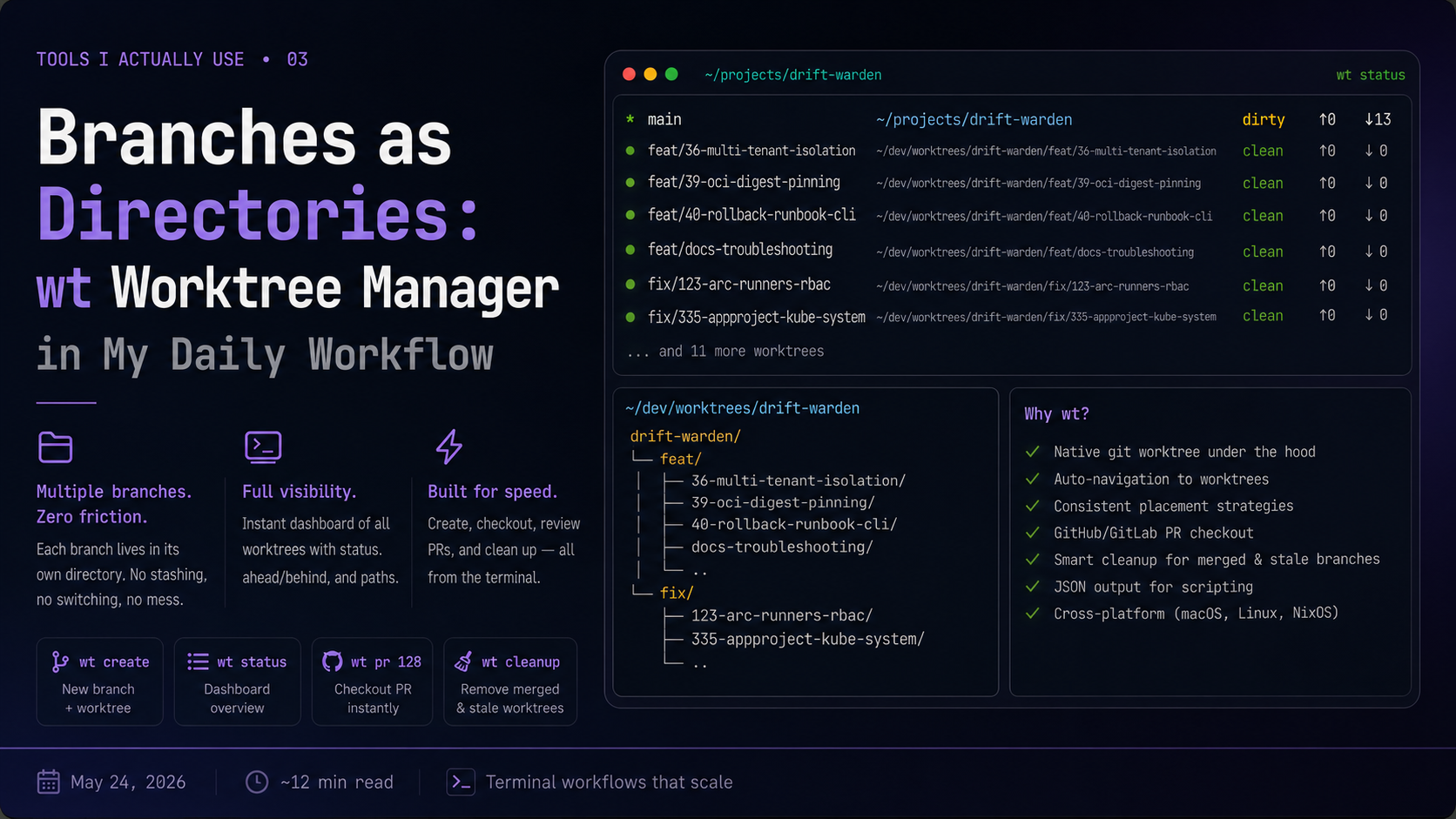
TL;DR: git worktree is a native git feature that lets you check out multiple branches simultaneously, each in its own directory. wt is a CLI that wraps it with auto-navigation, placement strategies, a status dashboard, and direct GitHub PR checkout. Instead of stashing, switching branches, and context-switching in a single directory, each branch is its own directory - always clean, always ready. Install wt on macOS with brew install timvw/tap/wt, on NixOS via the git-wt package.
In the previous post, wt status appeared as the startup command for every sesh session. That was the tip of the iceberg. wt is the tool that makes the multi-branch workflow I described in those posts actually work - it’s why each project session starts with a clear picture of what’s happening across all active branches, and why switching between them doesn’t require a single git stash or git checkout.
The Original Problem: Multiple Clones
Before git worktree existed, the only way to work on two branches of the same repository simultaneously was to clone the repository twice. Not stash - clone. Two full copies on disk, two sets of object databases, two places where commits could diverge and go out of sync. The workflow was either “clone it again” or “stash everything, switch, work, switch back, pop the stash” - and stash pops don’t always apply cleanly.
This isn’t a niche problem. It comes up constantly: a production bug lands while you’re mid-feature, a code review requires testing someone else’s branch, you want to run tests on main while developing on a feature branch. Every interruption required either a context-destroying branch switch or a separate clone that drifted from the original.
git worktree was introduced in git 2.5 (July 29, 2015) by Nguyễn Thái Ngọc Duy specifically to solve this. The core insight: a git repository is fundamentally two separate things.
The object store - all your commits, trees, blobs, refs - lives in .git/ and is completely branch-agnostic. It doesn’t care which branch you’re on; it just stores objects.
The working state - what’s currently checked out, what’s staged, where HEAD points - is what actually changes when you switch branches.
These two things don’t need to be coupled 1:1. Multiple working states can share a single object store. That’s what a linked worktree is.
git worktree: How It Actually Works
When you run git worktree add /path/other/feature-login feature-login, git creates two things:
- A new directory at /path/other/feature-login with the branch checked out
- A private sub-directory at $GIT_DIR/worktrees/feature-login/ inside the main repository’s .git/
The new directory does not contain a .git/ folder. Instead, it contains a .git file - a single line pointing back to the main repository:
gitdir: /path/main/.git/worktrees/feature-loginFrom there, two environment variables govern what’s shared and what isn’t:
$GIT_COMMON_DIR points to the main worktree’s .git/. Everything under it is shared across all worktrees: the object store (objects/), the ref namespace (refs/heads/, refs/tags/), the config, hooks, and the pack files. A commit you make in any worktree is immediately visible from all others - there’s only one object database.
$GIT_DIR points to the private worktrees/feature-login/ sub-directory. This is per-worktree state: HEAD (which commit is checked out), index (the staging area), ORIG_HEAD, MERGE_HEAD, CHERRY_PICK_HEAD, and the worktree-specific reflog.
.git/
├── objects/            ← shared (GIT_COMMON_DIR)
├── refs/               ← shared
├── config              ← shared
├── hooks/              ← shared
├── HEAD                ← main worktree only
├── index               ← main worktree only
└── worktrees/
    └── feature-login/
        ├── HEAD        ← per-worktree (points to feature-login branch)
        ├── index       ← per-worktree (staging area for this worktree)
        ├── gitdir      ← path back to the .git file in the worktree dir
        └── commondir   ← path back to the main .git/
One important safety property: git will not let you check out the same branch in two worktrees simultaneously. If feature-login is checked out in a linked worktree, trying to check it out in another worktree fails with an error. This prevents HEAD conflicts that could corrupt your working state - a protection you don’t have when using multiple clones.
The raw interface is verbose:
git worktree add /Users/twostal/dev/worktrees/myrepo/feature-login feature-login
git worktree add /Users/twostal/dev/worktrees/myrepo/hotfix-auth hotfix/auth
git worktree list
git worktree remove /Users/twostal/dev/worktrees/myrepo/feature-login
You have to manage paths manually, decide where to put things, and navigate there yourself. The feature is powerful but the ergonomics are intentionally low-level. For almost a decade it remained a power-user feature that most developers had never heard of. wt is the ergonomic layer on top.
wt: The Abstraction Layer
wt is a Go CLI by Tim Van Wassenhove that wraps git worktree with consistent placement, shell auto-navigation, and a status dashboard. The core model: wt knows where every worktree should live based on a configurable strategy, and the shell wrapper automatically cds you into the new directory after every create or checkout.
The Shell Wrapper: Why wt Is a Function
A critical detail: wt installs two things - a binary and a shell function. You source the function via wt shellenv in your shell profile:
# in .zshrc (or via Home Manager initExtra)
command -v wt &>/dev/null && source <(wt shellenv)
The shell function wraps the binary. When wt create or wt checkout succeeds, the binary prints a wt navigating to: /path/to/worktree line, the shell function parses it, and runs cd automatically. Without the shell function, wt works but you have to navigate manually - the binary can’t change your shell’s working directory. This is the same pattern used by zoxide, direnv, and other tools that need to affect shell state.
Placement Strategies
wt info shows the active placement strategy:
Strategy:  global
Pattern:   {.worktreeRoot}/{.repo.Name}/{.branch}
Root:      /Users/twostal/dev/worktrees
wt ships with six placement strategies:
| Strategy | Pattern | Example |
|---|---|---|
| global (my choice) | {root}/{repo}/{branch} | ~/dev/worktrees/wostal-eu/feat/login |
| sibling-repo | {main}/../{repo}-{branch} | ../wostal-eu-feat-login |
| parent-branches | {main}/../{branch} | ../feat/login |
| parent-worktrees | {main}/../{repo}.worktrees/{branch} | ../wostal-eu.worktrees/feat/login |
| parent-dotdir | {main}/../.worktrees/{branch} | ../.worktrees/feat/login |
| inside-dotdir | {main}/.worktrees/{branch} | ./.worktrees/feat/login |
The global strategy centralizes all worktrees under a single root (~/dev/worktrees), organized by repository then branch. Every repository I work on follows the same layout, which means paths are predictable and I can always find any worktree with a quick ls ~/dev/worktrees/.
The strategy is set via the WORKTREE_ROOT environment variable or ~/.config/wt/config.toml:
root = "/Users/twostal/dev/worktrees"
strategy = "global"
You can also set a per-repo strategy via .wt.toml in the repository root - useful for repos where you want worktrees to live alongside the main checkout instead of in the central directory.
Daily Commands
wt create
The command I run most. Creates a new branch from main (or any base) and opens a worktree for it:
wt create feat/oauth-flow
# => branch feat/oauth-flow created from main
# => worktree at ~/dev/worktrees/wostal-eu/feat/oauth-flow
# => shell navigates there automatically
With an explicit base branch:
wt create hotfix/session-rotation main
wt create experiment/new-parser develop
The shell drops you into the new directory immediately. Your main worktree (where main is checked out) is untouched - you can open a new tmux window and navigate back to it at any time with wt default.
wt checkout
For branches that already exist remotely or locally:
wt checkout feat/oauth-flow         # specific branch
wt checkout                         # fuzzy-find from branch list
The interactive mode (no argument) presents a filterable list of all branches with fuzzy matching. Select one, Enter, and the worktree is created or reused if it already exists.
wt status
The dashboard. This is what every sesh session starts with:
* main              /Users/twostal/projects/wostal-eu          dirty ↑0 ↓0
  feat/oauth-flow   ~/dev/worktrees/wostal-eu/feat/oauth-flow  clean ↑3 ↓0
  hotfix/session    ~/dev/worktrees/wostal-eu/hotfix/session    clean ↑1 ↓0
  fix/blog-tags     ~/dev/worktrees/wostal-eu/fix/blog-tags     clean ↑0 ↓0
Each row shows: the branch name, its worktree path, whether there are uncommitted changes (dirty/clean), and how many commits it’s ahead/behind the upstream. The * marks the current worktree. Colors: green for clean, red for dirty, yellow for ahead/behind.
This is why wt status is the session startup command. Before I type a single character of code, I can see: which branches are active, which have uncommitted work, which need to be pushed. It’s an orientation snapshot that takes 200ms to render and costs no cognitive effort to read.
wt pr
Checkout a GitHub PR directly into a worktree. Uses the gh CLI under the hood to look up the PR’s branch name:
wt pr 128                                          # by PR number
wt pr https://github.com/org/repo/pull/128         # by URL
wt pr                                              # interactive fuzzy selection
This lands you in the PR’s worktree immediately:
✓ PR #128 (feat/add-oidc-support) checked out at:
  ~/dev/worktrees/wostal-eu/feat/add-oidc-support
wt navigating to: ~/dev/worktrees/wostal-eu/feat/add-oidc-support
The combination with gh-dash is tight: from gh-dash you press C to kick off a Claude Code review, which runs gh pr view and gh pr diff. If you want to look at the code locally, run wt pr 128 from any terminal and you’re in the branch’s directory within seconds. No cloning, no fetching, no path management.
For GitLab: wt mr 123 does the same thing via the glab CLI.
wt cleanup
Removes worktrees for branches that have been merged or gone stale:
wt cleanup --dry-run              # preview what would be removed
wt cleanup --force                # remove merged branches
wt cleanup --stale --dry-run      # also flag remote-deleted and inactive branches
wt cleanup --stale --stale-days 14 --force
The —stale flag extends cleanup beyond merged branches to include:
- remote deleted - the remote branch was deleted (PR merged, branch deleted on GitHub)
- inactive - no commits in N days (default 30, configurable with —stale-days)
After a sprint where several PRs merged, wt cleanup —stale —force clears out the worktree directory in one command. Without this, worktrees accumulate.
wt default
Navigates back to the main worktree from wherever you are:
wt default
# wt navigating to: /Users/twostal/projects/wostal-eu
Useful when you’ve been deep in a feature worktree and need to get back to main quickly without typing the full path.
wt remove
Remove a specific worktree:
wt remove feat/oauth-flow      # specific branch
wt remove                      # fuzzy-find from worktree list
If you’re inside the worktree being removed, wt navigates you back to the main worktree automatically.
The JSON Interface
Every wt command supports —format json, which outputs a machine-readable envelope:
wt --format json status
# {"ok":true,"command":"wt status","data":{"worktrees":[
#   {"path":"...","branch":"main","dirty":true,"ahead":0,"behind":0,"current":true},
#   {"path":"...","branch":"feat/oauth-flow","dirty":false,"ahead":3,"behind":0,"current":false}
# ]}}
This is useful for scripting and for tools that want to read worktree state without parsing ANSI color codes. I use it occasionally for shell scripts that need to act on dirty worktrees or check ahead/behind counts before a release.
A Real Workflow: drift-warden
This is what the workflow looks like in practice, using drift-warden - a project I actively develop with multiple parallel branches.
The Session Startup
When I run sesh connect drift-warden (or switch to the session via C-a T), sesh creates the tmux session at ~/projects/drift-warden and runs wt status as the first command. This is what I see:
* main                              ~/projects/drift-warden                                          dirty ↑0 ↓13
  feat/36-multi-tenant-isolation    ~/dev/worktrees/drift-warden/feat/36-multi-tenant-isolation      clean ↑0 ↓0
  feat/37-tenant-init-cli           ~/dev/worktrees/drift-warden/feat/37-tenant-init-cli             clean ↑0 ↓0
  feat/39-oci-digest-pinning        ~/dev/worktrees/drift-warden/feat/39-oci-digest-pinning          clean ↑0 ↓0
  feat/40-rollback-runbook-cli      ~/dev/worktrees/drift-warden/feat/40-rollback-runbook-cli        clean ↑0 ↓0
  feat/docs-troubleshooting         ~/dev/worktrees/drift-warden/feat/docs-troubleshooting           clean ↑0 ↓0
  feat/local-01-cluster             ~/dev/worktrees/drift-warden/feat/local-01-cluster               clean ↑0 ↓0
  fix/123-arc-runners-rbac          ~/dev/worktrees/drift-warden/fix/123-arc-runners-rbac            clean ↑0 ↓0
  fix/335-appproject-kube-system    ~/dev/worktrees/drift-warden/fix/335-appproject-kube-system-...  clean ↑0 ↓0
  fix/337-argocd-eso-ignorediffs    ~/dev/worktrees/drift-warden/fix/337-argocd-eso-ignorediffs      clean ↑0 ↓0
  fix/339-kubescape-ignorediff-jq   ~/dev/worktrees/drift-warden/fix/339-kubescape-ignorediff-jq    clean ↑0 ↓0
  ...                               (11 more fix/ worktrees)
In under a second I have a full picture: main is dirty and 13 commits behind upstream - it needs a rebase. Six active feature branches, eleven active fixes. All clean (no uncommitted work in any of them). Three fix branches show no upstream - local-only branches not yet pushed.
This dashboard replaces the mental overhead of “where was I?” with a visual snapshot. I haven’t typed a single git command yet.
The On-Disk Layout
All worktrees live under ~/dev/worktrees/drift-warden/ organized by branch prefix:
~/dev/worktrees/drift-warden/
├── feat/
│   ├── 36-multi-tenant-isolation/    ← .git file, not folder
│   ├── 37-tenant-init-cli/
│   ├── 39-oci-digest-pinning/
│   ├── 40-rollback-runbook-cli/
│   ├── docs-troubleshooting/
│   └── local-01-cluster/
└── fix/
    ├── 123-arc-runners-rbac/
    ├── 335-appproject-kube-system-wildcard/
    ├── 337-argocd-eso-ignorediffs/
    └── ... (11 total)
Each of those directories has a .git file (not a folder) with one line:
gitdir: /Users/twostal/projects/drift-warden/.git/worktrees/36-multi-tenant-isolationAnd the corresponding metadata directory in the main .git/:
~/projects/drift-warden/.git/
└── worktrees/
    └── 36-multi-tenant-isolation/
        ├── HEAD        →  ref: refs/heads/feat/36-multi-tenant-isolation
        ├── commondir   →  ../..   (points back to .git/ - shared objects, refs, config)
        ├── gitdir      →  /Users/twostal/dev/worktrees/drift-warden/feat/36-multi-tenant-isolation/.git
        ├── index       (staging area for this worktree only)
        ├── logs/       (reflog for this worktree)
        └── ORIG_HEAD   (set during rebase/merge in this worktree)
This is the bidirectional pointer structure: the linked worktree points into .git/worktrees/, and .git/worktrees/ points back to the linked directory. Every worktree finds the shared object store via commondir → ../.. - the same commits, refs, and pack files, no duplication.
Picking Up a Feature Branch
I want to continue work on feat/39-oci-digest-pinning. From the session main window:
wt checkout feat/39-oci-digest-pinning
# Worktree already exists: ~/dev/worktrees/drift-warden/feat/39-oci-digest-pinning
# wt navigating to: ~/dev/worktrees/drift-warden/feat/39-oci-digest-pinning
Shell navigates there. The branch is checked out, the previous state of the staging area and reflog are intact. I open neovim, continue where I left off. The main window - where main is checked out - is untouched in a separate pane or window.
Creating a New Branch for Issue #42
A new issue comes in. Without leaving the current worktree:
wt create feat/42-helm-diff-gate
# ✓ Worktree created at: ~/dev/worktrees/drift-warden/feat/42-helm-diff-gate
# wt navigating to: ~/dev/worktrees/drift-warden/feat/42-helm-diff-gate
The new branch is cut from main, a fresh worktree is created, and the shell drops me there. The feat/39 work is still sitting in its own directory, untouched and un-stashed.
If I need to switch back:
wt checkout feat/39-oci-digest-pinning   # back to the OCI work
wt default                               # back to main
Reviewing a PR Without Leaving the Terminal
A PR review comes in on gh-dash (window 2 of the sesh session). PR #128 needs a local test. Without touching the browser:
wt pr 128
# ✓ PR #128 (feat/add-oidc-support) checked out at:
#   ~/dev/worktrees/drift-warden/feat/add-oidc-support
# wt navigating to: ~/dev/worktrees/drift-warden/feat/add-oidc-support
wt uses gh pr view 128 —json headRefName under the hood to look up the actual branch name, then creates the worktree. I’m in the PR’s branch within seconds, with the full local filesystem context - run tests, check configs, verify the change.
Cleanup After Merges
After a sprint where several PRs merged:
wt cleanup --stale --dry-run
# Would remove 7 worktree(s):
#   - fix/123-arc-runners-rbac  (merged)
#   - fix/335-appproject-kube-system-wildcard  (merged)
#   - fix/337-argocd-eso-ignorediffs  (remote deleted)
#   - fix/339-kubescape-ignorediff-jq  (merged)
#   - fix/grafana-alert-content  (inactive 31 days)
#   - fix/grafana-alert-instant-query  (inactive 31 days)
#   - fix/vmbackup-timing  (remote deleted)

wt cleanup --stale --force
# ✓ Removed 7 worktree(s)
—stale catches three categories: merged branches, branches whose remote was deleted (PR merged, GitHub deleted the branch), and branches inactive for more than 30 days. The —dry-run preview is essential before —force - I can verify the list before anything is deleted.
After cleanup, wt status shows a much shorter list. The cognitive load of “what’s active right now” maps directly to the number of rows in the dashboard.
Integration With the Full Stack
sesh + wt
From Tools 02, every sesh session starts with wt status as the startup_command:
session = [
  {
    name = "drift-warden";
    path = "~/projects/drift-warden";
    startup_command = "wt status";
    windows = [ "gh-dash" ];
  }
];
The session opens, wt status renders the branch dashboard, and the shell prompt waits in the main worktree. From there I can navigate to any feature worktree with wt checkout, or create a new one with wt create. The tmux session persists - all the worktrees I’ve navigated to stay open in separate windows or panes until I close them.
gh-dash + wt + wt pr
The three-tool PR review flow:
- gh-dash shows incoming PR #128 in Needs Review
- Press C → Claude Code review opens in a new tmux window
- While Claude analyzes: wt pr 128 in another window → land directly in the PR’s worktree
- Read the code locally, run tests, check the diff in context
- Back to gh-dash: press the built-in approve keybinding
This flow - dashboard → AI review → local checkout - covers the full PR review cycle without a browser or manual git commands.
graph TD
    A["wt status\n(session startup)"] --> B[branch dashboard]
    B --> C{intent}
    C -->|new feature| D["wt create feat/name\n→ new worktree + cd"]
    C -->|existing branch| E["wt checkout\n→ fuzzy pick + cd"]
    C -->|review PR| F["wt pr 128\n→ gh looks up branch + cd"]
    D --> G["work in ~/dev/worktrees/repo/branch"]
    E --> G
    F --> G
    G --> H["wt default\n→ back to main worktree"]
    G --> I["wt cleanup --stale --force\n→ remove merged worktrees"]
The Full Nix Declaration
On NixOS, wt is available as git-wt in nixpkgs. The package goes into the system packages list, and the shell integration is added via initExtra in programs.zsh:
# modules/nixos/packages.nix
{ pkgs }:
with pkgs;
[
  # ...
  git-wt
  # ...
]
# modules/shared/home-manager.nix
programs.zsh = {
enable = true;
initContent = ''
# wt shell integration (worktree manager)
command -v wt &>/dev/null && source <(wt shellenv)
'';
};The shell integration line is deliberately guarded with command -v wt &>/dev/null - if wt isn’t in $PATH (e.g., on a machine where it’s not installed), the source doesn’t fail and zsh starts normally. This matters on machines where you share a dotfile repo but haven’t installed all tools.
On macOS, wt is a Homebrew tap:
# modules/darwin/brews.nix
[
  # ...
  "timvw/tap/wt"
  # ...
]
The shell integration is identical - wt shellenv works the same on both platforms.
Installation Without Nix
macOS
brew install timvw/tap/wt

# Add shell integration
echo 'command -v wt &>/dev/null && source <(wt shellenv)' >> ~/.zshrc
source ~/.zshrc

# Verify
wt version
wt info
Configure the worktree root:
mkdir -p ~/dev/worktrees
export WORKTREE_ROOT="$HOME/dev/worktrees"
echo 'export WORKTREE_ROOT="$HOME/dev/worktrees"' >> ~/.zshrc
Linux
# From Go (any Linux)
go install github.com/timvw/wt@latest

# AUR (Arch)
yay -S git-wt

# NixOS (without Home Manager, imperative)
nix-env -iA nixpkgs.git-wt

# Shell integration (same for all)
echo 'command -v wt &>/dev/null && source <(wt shellenv)' >> ~/.zshrc
source ~/.zshrc
First Use
# Navigate to any git repository
cd ~/projects/my-project

# Check current state
wt status
wt info

# Create your first worktree
wt create feat/my-feature

# You're now in ~/dev/worktrees/my-project/feat/my-feature
# Main checkout at ~/projects/my-project is untouched

# Navigate back to main
wt default

# List all worktrees
wt list

# Clean up when done
wt cleanup --stale --dry-run
wt cleanup --stale --force
Summary
| Command | What It Does |
|---|---|
| wt create <branch> | New branch + worktree, shell navigates there |
| wt checkout [<branch>] | Existing branch into worktree, fuzzy-find if no arg |
| wt status | Color-coded dashboard: dirty/clean, ↑↓ tracking |
| wt pr [<number>] | GitHub PR → worktree via gh, fuzzy-find if no arg |
| wt mr [<number>] | GitLab MR → worktree via glab, fuzzy-find if no arg |
| wt cleanup —stale —force | Remove merged/stale/deleted worktrees |
| wt default | Navigate back to main worktree |
| wt remove [<branch>] | Remove specific worktree |
| wt info | Show active strategy and pattern |
The philosophical point: branches are not temporary states, they’re workspaces. The moment you treat a branch as a directory rather than a checkout state, the mental model changes. You don’t “switch to” a branch - you navigate to it, the same way you navigate between directories. Everything else - stashing, IDE reloads, context confusion - disappears.
wt status at session start. wt create for new work. wt pr for review. wt cleanup after the merge. Four commands cover the entire branch lifecycle.
The full configuration is in my nixos-config repository: git-wt in modules/nixos/packages.nix and the shell integration in modules/shared/home-manager.nix.