Terminal-First GitHub: gh CLI and gh-dash in My Daily Workflow

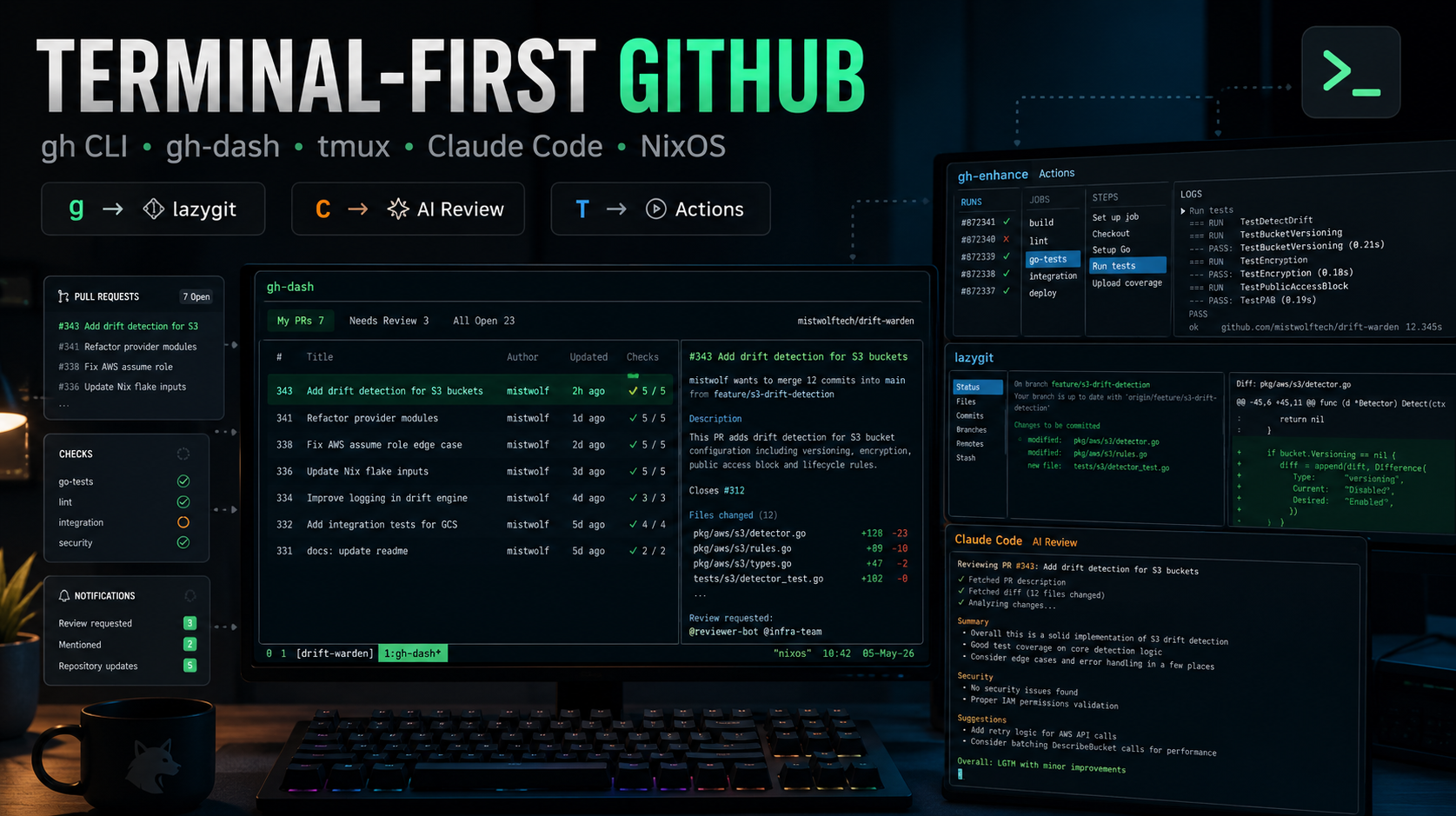
TL;DR: gh is the official GitHub CLI that makes every GitHub action scriptable from the terminal. gh-dash is a TUI extension on top of it that gives you a beautiful, keyboard-driven dashboard for PRs, issues, and notifications - with custom keybindings that can launch lazygit, trigger GitHub Actions, or kick off an AI-powered code review with Claude Code. The entire setup is declared in NixOS Home Manager and reproducible across every machine I own.
I spend the majority of my working day in the terminal. tmux is my window manager, neovim is my editor, lazygit handles git operations, and sesh keeps my sessions organized. The one thing that kept pulling me back to the browser was GitHub - checking PR status, reviewing diffs, tracking CI runs. That friction is now gone.
This is the first post in a new series: Tools I Actually Use. Not theoretical tools, not tools I tried once - tools that are wired into my daily workflow, configured in my NixOS repository, and running every single day. Let’s start with gh and gh-dash.
The Problem With the GitHub Web UI
The GitHub web UI is excellent for many things. But for a developer who lives in the terminal, it introduces constant context switches. You’re deep in a flow, you want to check if your PR has a review, and suddenly you’re in a browser tab, then three tabs become five, you’re reading a thread from three months ago, and your terminal focus is gone.
The goal is simple: handle 90% of GitHub interactions without leaving the terminal. gh + gh-dash gets me there.
gh: The Foundation
gh is GitHub’s official CLI, written in Go. Released in 2020, it’s worth distinguishing it from the older hub tool many developers remember. hub was a git proxy - it intercepted git commands and wrapped them with GitHub awareness. gh is architecturally different: it’s a standalone binary that speaks GitHub’s REST and GraphQL APIs directly. You run it alongside git, not instead of it. git manages your local history and objects; gh manages GitHub concepts - pull requests, issues, releases, workflow runs, secrets.
This distinction matters for how you think about the tool. gh pr checkout 42 doesn’t rewrite how git works - it just calls the GitHub API to get the branch name, then runs the appropriate git commands for you. The two tools are composable, not competing.
What gh Actually Does
At its core, gh maps GitHub’s resource model to intuitive subcommands:
# Pull Requests
gh pr list                          # list open PRs in current repo
gh pr view 42                       # view PR #42
gh pr diff 42                       # show the full diff
gh pr review 42 --approve           # approve a PR
gh pr merge 42 --squash             # merge with squash
gh pr checkout 42                   # check out the PR branch locally
gh pr create --title "..." --body "..."

# Issues
gh issue list --assignee @me
gh issue create --title "..." --label bug

# GitHub Actions
gh run list                         # list recent workflow runs
gh run view 12345678                # view run details
gh run watch 12345678               # stream logs in real time
gh workflow run deploy.yml --ref main

# Repos
gh repo clone org/repo
gh repo create my-new-project --private --clone
gh repo fork upstream/repo --clone

# Releases
gh release create v1.2.3 --generate-notes
gh release download v1.2.3 --pattern "*.tar.gz"
The depth goes further: gh api gives you raw access to every GitHub API endpoint with pagination support (—paginate —slurp), inline jq filtering (—jq), and Go template output (—template). gh search lets you query across repos and PRs globally. gh auth switch (added in v2.40.0) handles multiple GitHub accounts without needing separate token files. gh copilot integrates GitHub Copilot in the CLI.
The Extension System
gh’s real superpower is its extension system. Extensions are just standalone binaries (or scripts) prefixed with gh-, placed in $PATH, and instantly callable as gh
gh extension install dlvhdr/gh-dash
gh extension install nicholasgasior/gsfmt
gh extension install mislav/gh-branch
Or list what you have:
gh extension listThis composability is what transforms gh from a solid CLI into an ecosystem. The extension model is deliberately simple - any executable that starts with gh- qualifies. This means the community can extend gh in any language, and the installation is just a gh extension install away.
The alias System
gh also supports custom aliases for frequently used command sequences:
gh alias set prs 'pr list --author @me --state open'
gh alias set mine 'issue list --assignee @me'
These live in ~/.config/gh/config.yml and travel with your dotfiles.
My gh Configuration in NixOS Home Manager
My entire gh configuration is declared in modules/shared/home-manager.nix:
programs.gh = {
  enable = true;
  extensions = with pkgs; [
    gh-dash
    gh-enhance
  ];
  gitCredentialHelper = {
    enable = true;
  };
  settings = {
    editor = "nvim";
    git_protocol = "ssh";
  };
};
Three things worth noting here:
-
Extensions are Nix packages - gh-dash and gh-enhance are declared as Nix packages rather than installed via gh extension install. This means they’re pinned to a specific version via flake.lock, reproducible across every machine, and updated with the rest of the system through nix flake update.
-
git_protocol = “ssh” - all gh operations use SSH rather than HTTPS. Combined with my SSH key configuration (which uses id_ed25519 with AddKeysToAgent yes), authentication is seamless.
-
gitCredentialHelper.enable = true - gh acts as a Git credential helper, so git push to GitHub repos works without entering credentials even for HTTPS URLs.
The credential helper integration is particularly valuable in environments where SSH isn’t available (some corporate firewalls, certain CI runners). With this enabled, gh auth login configures Git’s credential store, and every subsequent git operation uses gh’s authentication context.
gh-dash: The TUI Dashboard
gh-dash is a terminal UI built on top of gh, created by Dolev Hadar. It presents a configurable, keyboard-driven dashboard with sections for PRs, issues, and notifications - across multiple repositories simultaneously.
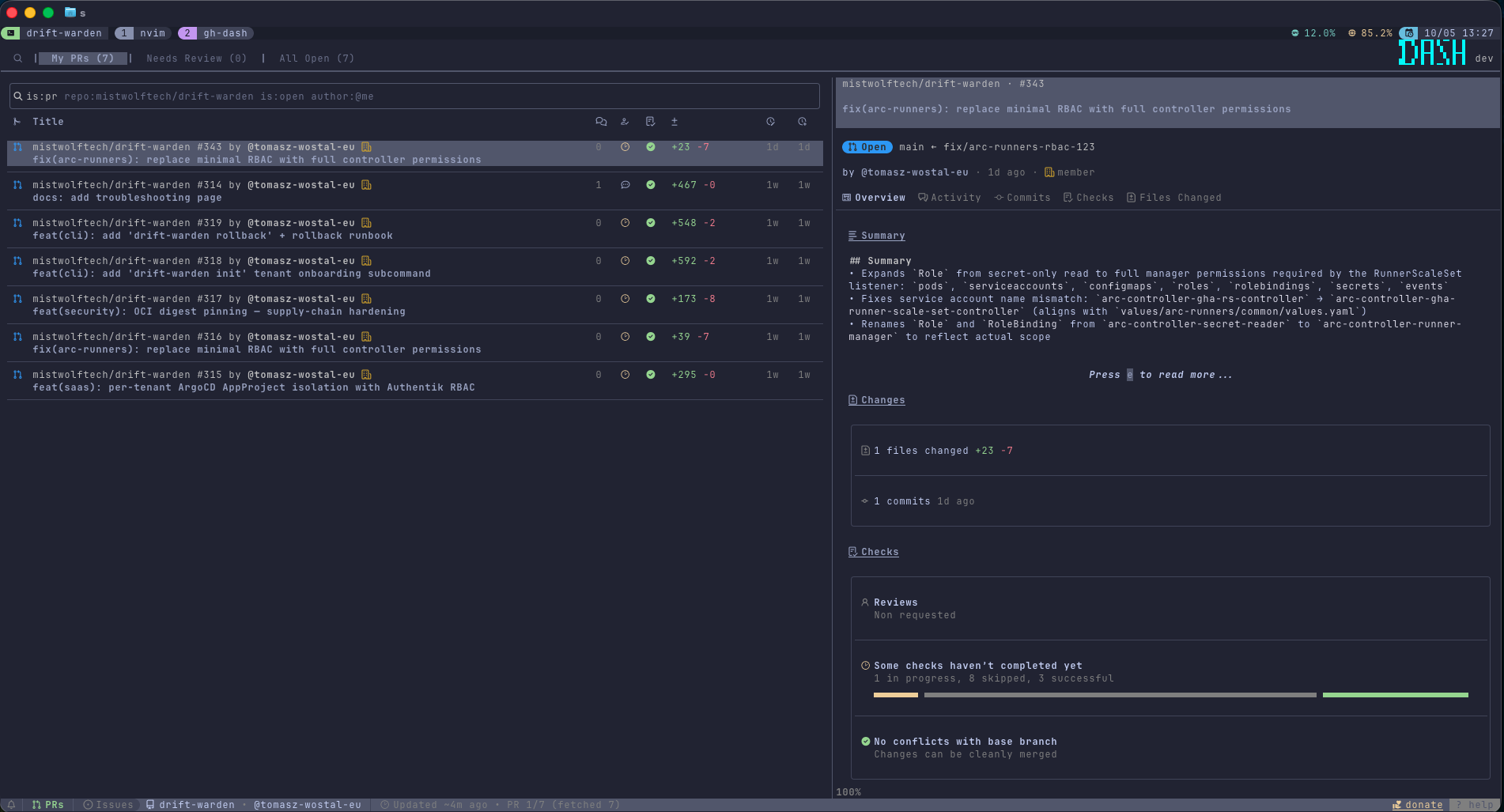
You launch it with gh dash. That’s it.
Configuration Deep Dive
My gh-dash configuration lives in ~/.config/gh-dash/config.yml, managed declaratively via modules/shared/files.nix. Here’s the full config with commentary:
prSections:
  - title: My PRs
    filters: is:open author:@me
  - title: Needs Review
    filters: is:open review-requested:@me
  - title: All Open
    filters: is:open

issuesSections:
  - title: My Issues
    filters: is:open author:@me
  - title: Assigned
    filters: is:open assignee:@me

notificationsSections:
  - title: All
    filters: ""
  - title: Review Requested
    filters: reason:review-requested
  - title: Mentioned
    filters: reason:mention
The filters field accepts the same syntax as GitHub’s search API - the same expressions you’d type in the GitHub search bar. This is powerful because you have the full expressiveness of GitHub search: is:open, label:bug, milestone:v2.0, draft:false, created:>2026-01-01, and so on. Note that is:pr and archived:false are automatically appended to PR section filters; you don’t need to include them.
gh-dash also extends the filter syntax with a built-in time helper: {{ nowModify “-2w” }} expands to the RFC3339 date two weeks ago. This is useful for scoping “recently active” sections:
- title: Involved Recently
  filters: >-
    is:open
    involves:@me
    -author:@me
    updated:>={{ nowModify "-2w" }}
No more hardcoding dates in your config.
defaults:
  preview:
    open: true
    width: 0.45
    # position: right | bottom | auto (switches at 80 columns)
  prsLimit: 20
  issuesLimit: 20
  notificationsLimit: 20
  view: prs
  refetchIntervalMinutes: 30
  smartFilteringAtLaunch: true

pager:
  diff: delta   # or: less, bat, diff-so-fancy
preview.open: true means the detail pane opens automatically. width: 0.45 allocates 45% of the terminal width to the preview - wide enough to see PR descriptions without cluttering the list. refetchIntervalMinutes: 30 triggers a background refresh every 30 minutes so you don’t see stale data. Set it to 0 to disable auto-refresh entirely.
smartFilteringAtLaunch: true automatically scopes the view to the repository in your current working directory when you launch gh dash from inside a repo. Open it from ~/projects/wostal-eu and the All Open section shows only that repo’s PRs. Open it from ~ and you get the global view. This is a small feature that makes a big usability difference.
pager.diff controls which pager renders diffs in the preview pane. delta is the best choice if you have it installed - it provides syntax highlighting, line numbers, and side-by-side diffs in the terminal.
repoPaths: Linking Repos to Local Paths
This feature is subtle but important. When gh-dash knows where a repo lives on disk, it can pass {{.RepoPath}} to custom keybinding commands:
repoPaths:
  mistwolftech/*: ~/projects/*
This glob pattern means any repo under the mistwolftech GitHub organization maps to ~/projects/ locally. So mistwolftech/wostal-eu maps to ~/projects/wostal-eu, mistwolftech/drift-warden to ~/projects/drift-warden, etc.
Without this, you’d have to cd manually before running any local operations from gh-dash. With it, your keybindings can cd {{.RepoPath}} &&
Custom Keybindings: The Real Power
This is where gh-dash goes from “nice dashboard” to “core workflow tool”. Custom keybindings let you attach arbitrary shell commands to keypresses, with access to template variables populated from the currently selected item.
Here are my three keybindings:
keybindings:
  prs:
    - key: g
      name: lazygit
      command: >-
        tmux new-window '
          cd {{.RepoPath}} && lazygit
        '

    - key: C
      name: claude review
      command: >-
        tmux new-window '
          cd {{.RepoPath}} && claude "Review PR {{.PrNumber}}. Run gh pr view {{.PrNumber}} for description and gh pr diff {{.PrNumber}} for changes. Provide a thorough code review."
        '

    - key: T
      name: actions
      command: >-
        tmux new-window '
          gh enhance -R {{.RepoName}} {{.PrNumber}}
        '
Let me break these down.
g → lazygit
Press g on any PR and a new tmux window opens with lazygit launched at the repo’s root. This is useful when you want to do something beyond what gh dash exposes - cherry-pick a commit, look at the full reflog, interactively stage specific hunks before pushing a fix. You’re already in context (the right repo, the right branch via gh pr checkout) and lazygit opens immediately.
The tmux new-window ’…’ pattern is intentional. Instead of replacing the gh-dash window, it opens a parallel window. You can Ctrl-a H/L back and forth without losing your place in the dashboard.
C → AI Code Review
This is the keybinding I’m most proud of. Press C on any PR and a new tmux window opens running:
claude "Review PR {{.PrNumber}}. Run gh pr view {{.PrNumber}} for description and gh pr diff {{.PrNumber}} for changes. Provide a thorough code review."This kicks off a Claude Code session with a pre-filled prompt that instructs it to:
- Fetch the PR description via gh pr view
- Fetch the full diff via gh pr diff
- Produce a thorough code review
Claude Code has native gh access (via the Bash tool) and can interact with the GitHub CLI directly. The review it produces covers things like:
- Security implications (SQL injection, command injection, XSS vectors)
- Logic correctness and edge cases
- Architectural concerns and coupling
- Test coverage gaps
- Documentation and naming clarity
What makes this particularly powerful is that Claude Code isn’t just reading the diff - it can use gh to pull additional context: fetching linked issues, reading other PRs that touched the same files, checking the repo’s existing tests. It’s a full agentic review session triggered by a single keypress from gh-dash.
This pattern is especially valuable in two situations. First, if you use Claude Code as your primary coding assistant, the same AI that helped you write the code can now review it — it already has context about the codebase and your conventions. Second, if you’re a one-man army: no colleagues to ping, no one to ask for a second pair of eyes. An AI review catches the obvious mistakes and gives you something to push back against before you merge.
I use Claude Code here, but the command is just a shell string — you can swap it for any CLI-accessible AI. Gemini CLI, OpenAI Codex CLI, or any tool that reads stdin works. The pattern is the same:
# Claude Code (my default)
claude "Review PR {{.PrNumber}} ..."

# Gemini CLI
gemini "Review PR {{.PrNumber}} ..."

# Codex CLI
codex "Review PR {{.PrNumber}} ..."
Pick whatever model you already pay for. The gh pr diff output is the same regardless of which AI reads it.
This workflow replaced probably 30-40% of my manual PR review time. For PRs on repos I’m deeply familiar with, I use it as a first-pass filter. For PRs on repos I’m less familiar with, it gives me a head start on understanding what the change is doing.
T → GitHub Actions (gh-enhance)
Press T to open gh-enhance - another extension by the same author as gh-dash - scoped to the selected PR’s workflows. You get a four-column TUI: Runs on the left, then Jobs, Steps, and a live log stream on the right.
gh enhance -R {{.RepoName}} {{.PrNumber}}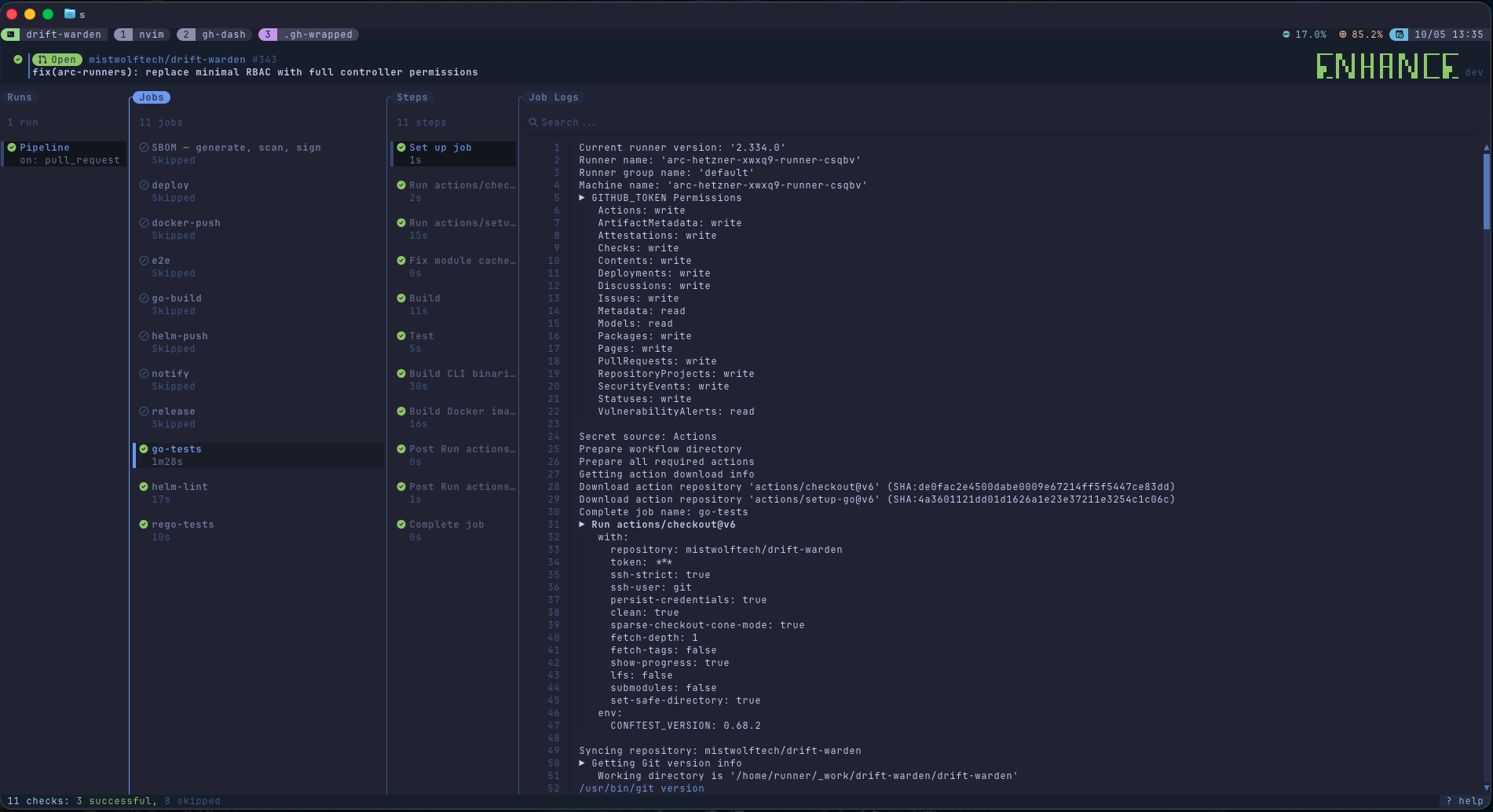
{{.RepoName}} scopes the view to org/repo, so you only see runs triggered by this specific PR - not the full repository history. From here you can navigate between jobs (the go-tests job is selected in the screenshot above), drill into individual steps, and stream live logs - all without opening a browser tab.
The combination of T for actions and C for AI review means I can look at a failing CI run, understand what broke, and kick off a full code review - all without leaving the terminal, all with a single keypress from the same list view.
Available Template Variables
gh-dash provides these template variables for keybindings (in the context of a PR):
| Variable | Scope | Value |
|---|---|---|
| {{.PrNumber}} | PRs | PR number (e.g., 42) |
| {{.HeadRefName}} | PRs | Source branch name |
| {{.BaseRefName}} | PRs | Target branch name |
| {{.Author}} | PRs, Issues | Author login |
| {{.IssueNumber}} | Issues | Issue number |
| {{.IssueTitle}} | Issues | Issue title |
| {{.RepoName}} | All | Full repo name (org/repo) |
| {{.RepoPath}} | All | Local path from repoPaths |
The template engine is Go’s text/template, so you can use conditionals and functions if you need more complex logic.
Beyond custom shell commands, gh-dash also exposes built-in actions you can bind to keys with builtin: instead of command:. For PRs: checkout, approve, merge, diff, comment, close, reopen, ready, assign, update, watchChecks. For issues: close, reopen, comment, label, assign. Universal built-ins include togglePreview, openGithub, refresh, copyurl, search, and quit. These are useful when you want a key that does something gh-dash already knows how to do, without shelling out.
UI and Theme
theme:
  ui:
    sectionsShowCount: true
    table:
      showSeparator: true
      compact: false
confirmQuit: false
sectionsShowCount: true shows the item count in each tab - I find this immediately useful for at-a-glance triage. confirmQuit: false means q exits immediately without a confirmation dialog, which is the right behavior for a tool you’ll open and close dozens of times per day.
Integration with sesh and tmux
gh-dash doesn’t live in isolation - it’s wired into my broader terminal session management via sesh. I’ve configured sesh to treat gh dash as a named window template:
programs.sesh = {
  settings.window = [
    {
      name = "gh-dash";
      startup_script = "gh dash";
    }
    # ...
  ];
  settings.session = [
    {
      name = "drift-warden";
      path = "~/projects/drift-warden";
      startup_command = "wt status";
      windows = [ "gh-dash" ];
    }
    {
      name = "mistwolf-tech";
      path = "~/projects/mistwolf-tech";
      startup_command = "wt status";
      windows = [ "gh-dash" ];
    }
  ];
};
This means when I sesh connect drift-warden, two things happen automatically:
- The main window opens at ~/projects/drift-warden and runs wt status (my worktree manager)
- A second window named gh-dash opens running gh dash
The GitHub dashboard is ready before I’ve typed a single character. No setup, no manual launch - it’s just there, waiting, scoped to the project I switched to.
tmux session: drift-warden
├── window 0: drift-warden [wt status]
└── window 1: gh-dash [gh dash]
graph TD
A["sesh connect drift-warden"] --> B["tmux session: drift-warden"]
B --> C["window 0: wt status"]
B --> D["window 1: gh dash"]
D --> E{keypress}
E -->|g| F["new window: lazygit"]
E -->|C| G["new window: claude review"]
E -->|T| H["new window: gh enhance"]
G --> I["gh pr view + gh pr diff\n→ Claude Code analysis"]
The Full Nix Declaration
Here’s how the entire gh/gh-dash setup is declared in my NixOS config - split across two files:
modules/shared/packages.nix - gh itself (available system-wide):
{ pkgs }:
with pkgs;
[
  # ...
  gh
  # ...
]
modules/shared/home-manager.nix - gh Home Manager program with extensions and settings:
programs.gh = {
  enable = true;
  extensions = with pkgs; [
    gh-dash
    gh-enhance
  ];
  gitCredentialHelper.enable = true;
  settings = {
    editor = "nvim";
    git_protocol = "ssh";
  };
};
modules/shared/files.nix - gh-dash config as a managed file:
home.file.".config/gh-dash/config.yml".text = ''
  prSections:
    - title: My PRs
      filters: is:open author:@me
    - title: Needs Review
      filters: is:open review-requested:@me
    - title: All Open
      filters: is:open
  issuesSections:
    - title: My Issues
      filters: is:open author:@me
    - title: Assigned
      filters: is:open assignee:@me
  notificationsSections:
    - title: All
      filters: ""
    - title: Review Requested
      filters: reason:review-requested
    - title: Mentioned
      filters: reason:mention
  defaults:
    preview:
      open: true
      width: 0.45
    prsLimit: 20
    issuesLimit: 20
    notificationsLimit: 20
    view: prs
    refetchIntervalMinutes: 30
  repoPaths:
    mistwolftech/*: ~/projects/*
  keybindings:
    prs:
      - key: g
        name: lazygit
        command: >-
          tmux new-window '
            cd {{.RepoPath}} && lazygit
          '
      - key: C
        name: claude review
        command: >-
          tmux new-window '
            cd {{.RepoPath}} && claude "Review PR {{.PrNumber}}. Run gh pr view {{.PrNumber}} for description and gh pr diff {{.PrNumber}} for changes. Provide a thorough code review."
          '
      - key: T
        name: actions
        command: >-
          tmux new-window '
            gh enhance -R {{.RepoName}} {{.PrNumber}}
          '
  theme:
    ui:
      sectionsShowCount: true
      table:
        showSeparator: true
        compact: false
  confirmQuit: false
'';
The key design decision here is that gh-dash’s config goes into files.nix (as a raw file managed by home.file) rather than as a structured programs.gh-dash declaration. Home Manager doesn’t have a programs.gh-dash module as of this writing - the extension isn’t natively modeled. The home.file approach is the correct fallback: Nix manages the file, it’s tracked in git, and it deploys consistently to every machine.
Daily Workflow
Here’s what a typical PR review session looks like:
- Open a new sesh session for the project - gh-dash window is already running
- Scan the Needs Review section for incoming review requests
- Press Enter to open the preview pane and read the description
- Press C to kick off a Claude Code review in a new tmux window
- While Claude reads the diff and builds its analysis, switch back to gh-dash with Ctrl-a H
- Check the My PRs section - see if any of my own PRs have new comments
- Press T on a PR with a failed CI run to open gh-enhance and scan the logs
- Fix the issue, push - the gh-dash preview auto-refreshes within the polling interval
The entire workflow stays in the terminal. The browser opens for edge cases: complex PR threads where inline comment context matters, image-heavy discussions, or the occasional GitHub UI feature that gh doesn’t yet expose. But that’s rare.
Installation Without Nix
If you’re not using Nix, the setup is still straightforward:
# macOS
brew install gh
gh extension install dlvhdr/gh-dash
gh extension install nicholasgasior/gh-enhance  # if available

# Linux (official GH apt repo)
curl -fsSL https://cli.github.com/packages/githubcli-archive-keyring.gpg \
  | sudo dd of=/usr/share/keyrings/githubcli-archive-keyring.gpg
echo "deb [arch=$(dpkg --print-architecture) signed-by=/usr/share/keyrings/githubcli-archive-keyring.gpg] https://cli.github.com/packages stable main" \
  | sudo tee /etc/apt/sources.list.d/github-cli.list > /dev/null
sudo apt update && sudo apt install gh

gh auth login
gh extension install dlvhdr/gh-dash
Then create ~/.config/gh-dash/config.yml with the sections and keybindings above. The repoPaths mapping needs to be adjusted to match your local directory structure.
For the Claude Code keybinding to work, you need claude in your $PATH - which means Claude Code installed and authenticated.
Summary
| Tool | Role | Why It Matters |
|---|---|---|
| gh | GitHub API in the terminal | Scriptable, composable, credential-aware |
| gh-dash | TUI dashboard for PRs/issues | No browser context switches |
| gh-enhance | Actions TUI | CI log streaming without leaving the terminal |
| Claude Code keybinding | AI-powered review | One keypress, full agentic diff analysis |
| sesh integration | Session management | gh-dash auto-launches with every project |
| Nix Home Manager | Declarative config | Same setup on every machine, pinned versions |
The philosophical point behind this setup: tools should reduce friction, not add it. Every browser tab I don’t open, every context switch I avoid, every manual step I eliminate - these add up over a full working day. gh + gh-dash + the Claude Code keybinding didn’t just make GitHub access faster. They made it frictionless enough that I actually do more thorough PR reviews, because the activation energy is nearly zero.
The full configuration is in my nixos-config repository: modules/shared/home-manager.nix for the gh program declaration and modules/shared/files.nix for the gh-dash config file.
Next in the Tools I Actually Use series: sesh + tmux - the session management stack that ties all of this together.